Deploying MS SQL with Era
In this lab you will create a MSSQL Software Profile, and use Era to deploy a new MSSQL Database Server.
Creating a New MSSQL Database Server
You’ve completed all the one time operations required to be able to provision any number of SQL Server VMs. Follow the steps below to provision a database of a fresh database server, with best practices automatically applied by Era.
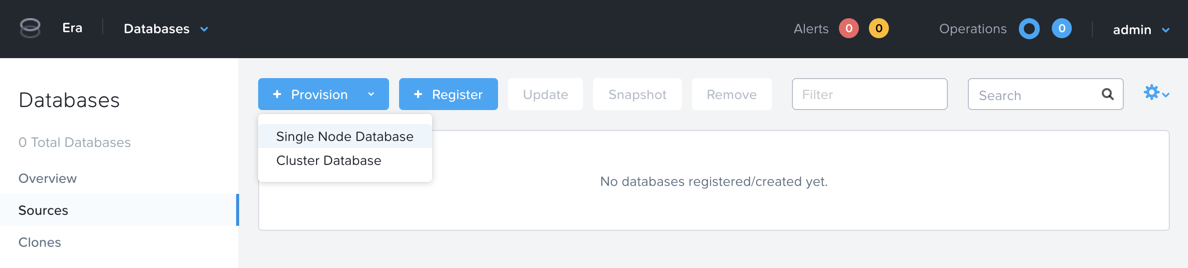
In Era, select Databases from the dropdown menu and Sources from the lefthand menu.
Click + Provision > Single Node Database.
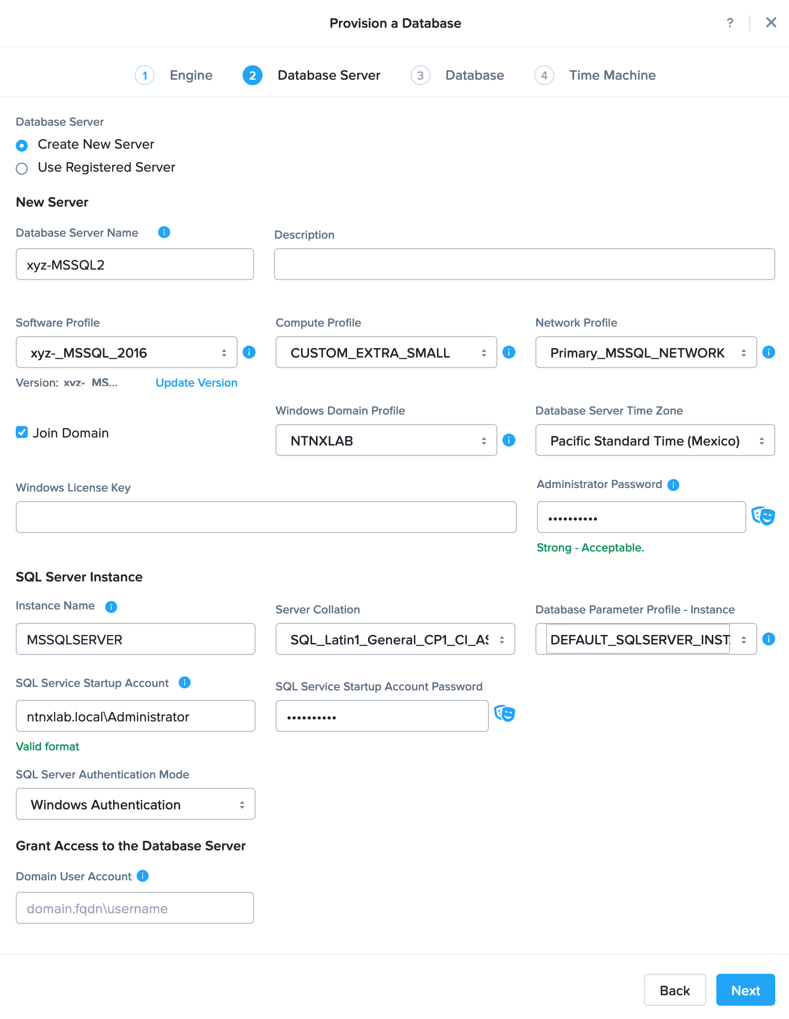
In the Provision a Database wizard, fill out the following fields to configure the Database Server:
Engine - Microsoft SQL Server
Database Server - Create New Server
Database Server Name - Initials-MSSQL2
Description - (Optional)
Software Profile - Initials_MSSQL_2016
Compute Profile - CUSTOM_EXTRA_SMALL
Network Profile - Primary_MSSQL_NETWORK
Database Time Zone - Pacific Standard time
Select Join Domain
Windows Domain Profile - NTNXLAB
Windows License Key - (Leave Blank)
Administrator Password - Nutanix/4u
Instance Name - MSSQLSERVER
Server Collation - Default
Database Parameter Profile - DEFAULT_SQLSERVER_INSTANCE_PARAMS
SQL Service Startup Account - ntnxlab.local\Administrator
SQL Service Startup Account Password - nutanix/4u
SQL Server Authentication Mode - Windows Authentication
Domain User Account - (Leave Blank)
Note
A Instance Name is the name of the database server, this is not the hostname. The default is MSSQLSERVER. You can install multiple separate instances of MSSQL on the same server as long as they have different instance names. This was more common on a physical server, however, you do not need additional MSSQL licenses to run multiple instances of SQL on the same server.
Server Collation is a configuration setting that determines how the database engine should treat character data at the server, database, or column level. SQL Server includes a large set of collations for handling the language and regional differences that come with supporting users and applications in different parts of the world. A collation can also control case sensitivity on database. You can have different collations for each database on a single instance. The default collation is SQL_Latin1_General_CP1_CI_AS which breaks out like below:
Latin1 makes the server treat strings using charset latin 1, basically ASCII
CP1 stands for Code Page 1252. CP1252 is single-byte character encoding of the Latin alphabet, used by default in the legacy components of Microsoft Windows for English and some other Western languages
CI indicates case insensitive comparisons, meaning ABC would equal abc
AS indicates accent sensitive, meaning ü does not equal u
Database Parameter Profiles define the minimum server memory SQL Server should start with, as well as the maximum amount of memory SQL server will use. By default, it is set high enough that SQL Server can use all available server memory. You can also enable contained databases feature which will isolate the database from others on the instance for authentication.
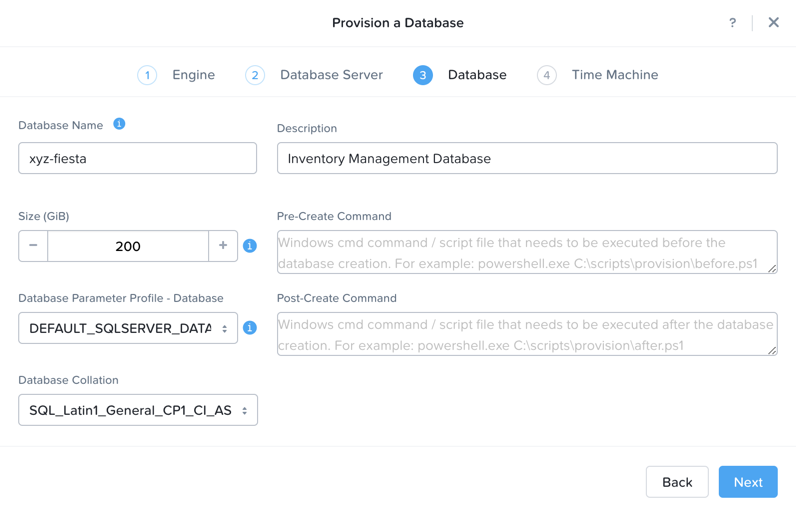
Click Next, and fill out the following fields to configure the Database:
Database Name - Initials-fiesta
Description - (Optional)
Size (GiB) - 200 (Default)
Database Parameter Profile - DEFAULT_SQLSERVER_DATABASE_PARAMS
Note
Common applications for pre/post-installation scripts include:
Data masking scripts
Register the database with DB monitoring solution
Scripts to update DNS/IPAM
Scripts to automate application setup, such as app-level cloning for Oracle PeopleSoft
Click Next and fill out the following fields to configure the Time Machine for your database:
Note
It is critical to select the BRONZE SLA in the following step. The default BRASS SLA does NOT include Continuous Protection snapshots.Name - initials-fiesta_TM (Default)
Description - (Optional)
SLA - DEFAULT_OOB_BRONZE_SLA
Schedule - (Defaults)
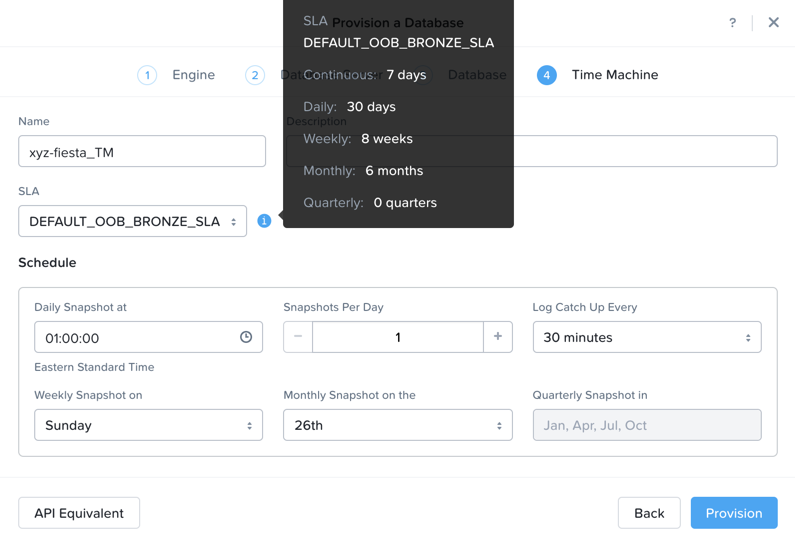
Click Provision to begin creating your new database server VM and fiesta database.
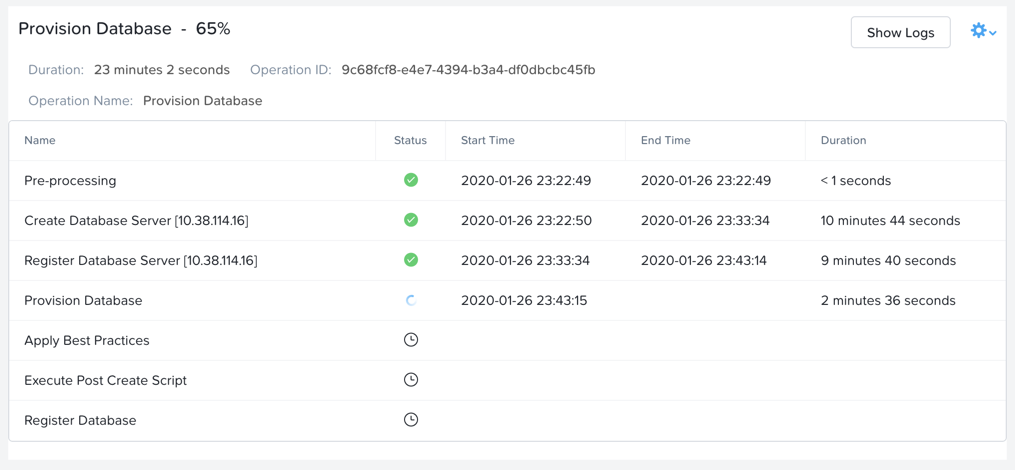
Select Operations from the dropdown menu to monitor the provisioning. This process should take approximately 20 minutes.
Note
Observe the step for applying best practices in Operations.
Some of the best practices automatically configured by Era include:
Distribute databases and log files across multiple vDisks.
Do not use Windows dynamic disks or other in-guest volume management
Distribute vDisks across multiple SCSI controllers (for ESXi)
For each database, use multiple data files: one file per vCPU.
Configure initial log file size to 4 GB or 8 GB and iterate by the initial amount to reach the desired size.
Use multiple TempDB data files, all the same size.
Use available hypervisor network control mechanisms (for example, VMware NIOC).
Exploring the Provisioned DB Server
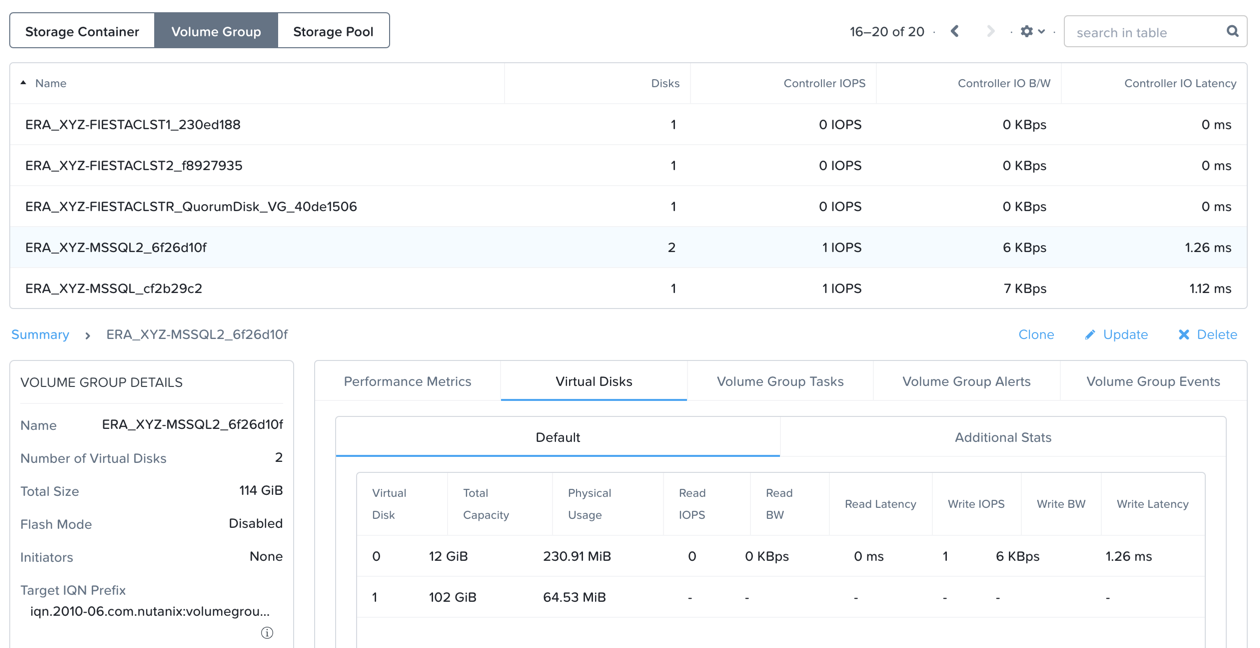
In Prism Element > Storage > Table > Volume Groups, locate the ERA_Initials_MSSQL2_** VG and observe the layout on the **Virtual Disk tab. <What does this tell us?>
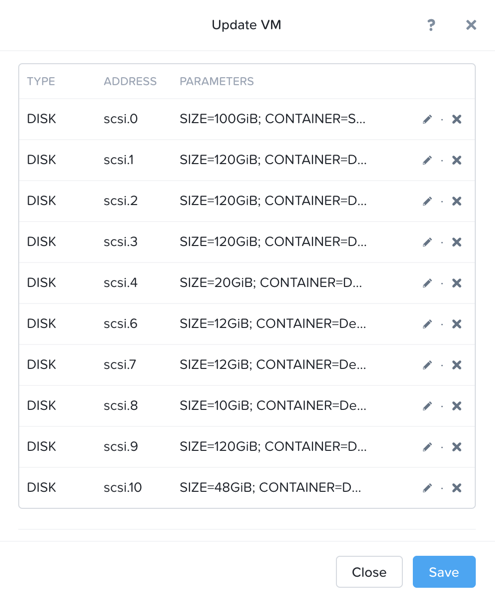
View the disk layout of your newly provisioned VM in Prism. <What are all of these disks and how is this different from the original VM we registered?>
In Prism, note the IP address of your Initials-MSSQL2 VM and connect to it via RDP using the following credentials:
User Name - NTNXLAB\Administrator
Password - nutanix/4u
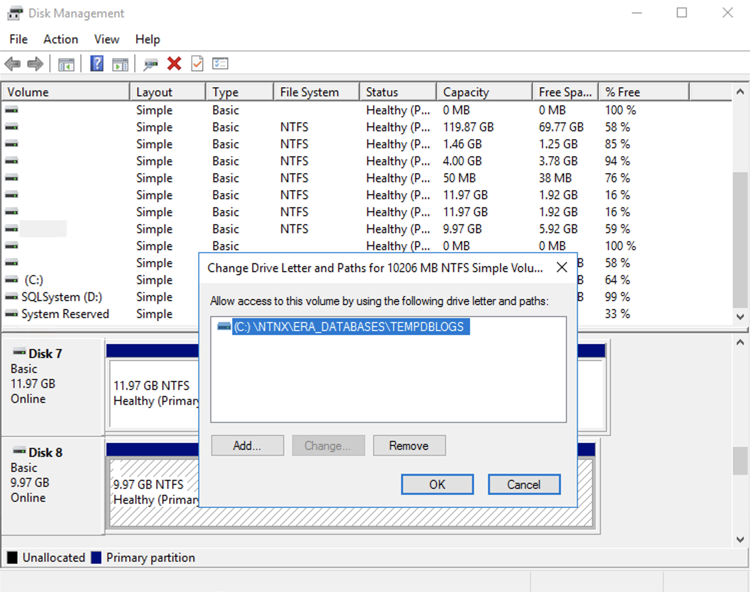
Open Start > Run > diskmgmt.msc to view the in-guest disk layout. Right-click an unlabeled volume and select Change Drive Letter and Paths to view the path to which Era has mounted the volume. Note there are dedicated drives corresponding to SQL data and log locations, similar to the original SQL Server to which you manually applied best practices.
Migrating Fiesta App Data
In this exercise you will import data directly into your database from a backup exported from another database. While this is a suitable method for migrating data, it potentially involved downtime for an application, or our database potentially not having the very latest data.
Another approach could involve adding your new Era database to an existing database cluster (AlwaysOn Availability Group) and having it replicate to your Era provisioned database. Application level synchronous or asynchronous replication (such as SQL Server AAG or Oracle RAC) can be used to provide Era benefits like cloning and Time Machine to databases whose production instances run on bare metal or non-Nutanix infrastructure.
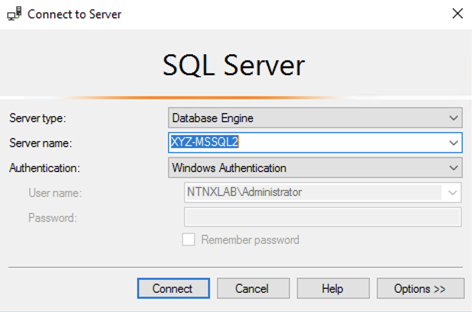
From your Initials-MSSQL2 RDP session, launch Microsoft SQL Server Management Studio and click Connect to authenticate as the currently logged in user.
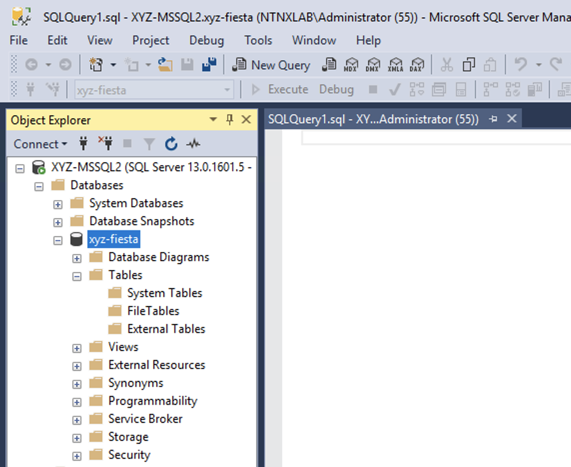
Expand the Initials-fiesta database and note that it contains no tables. With the database selected, click New Query from the menu to import your production application data.
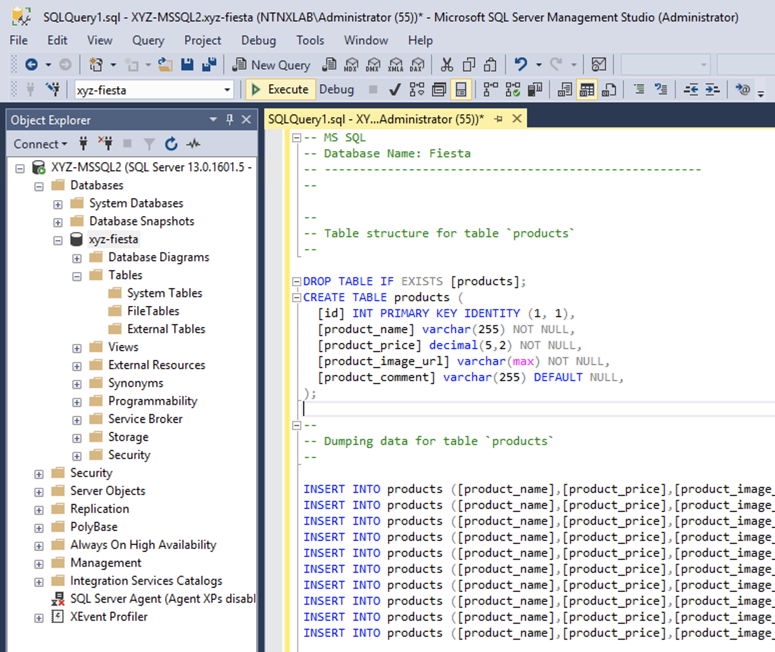
Copy and paste the following script into the query editor and click Execute:
FiestaDB Data Import Script¶-- MS SQL -- Database Name: Fiesta -- ------------------------------------------------------ -- -- -- Table structure for table `products` -- DROP TABLE IF EXISTS [Products]; CREATE TABLE Products ( [id] INT PRIMARY KEY IDENTITY (1, 1), [product_name] varchar(255) NOT NULL, [product_price] decimal(5,2) NOT NULL, [product_image_url] varchar(max) NOT NULL, [product_comment] varchar(255) DEFAULT NULL, ); -- -- Dumping data for table `products` -- INSERT INTO Products ([product_name],[product_price],[product_image_url],[product_comment]) VALUES ('12 large ballons',2.30,'https://cdn.shopify.com/s/files/1/1832/6341/products/BLOON_MET_GOLD__01_1000x.jpg?v=1571327220','On back order'); INSERT INTO Products ([product_name],[product_price],[product_image_url],[product_comment]) VALUES ('Single Banquet Chair Cover',2.99,'https://cdn.shopify.com/s/files/1/1832/6341/products/SASH_71_046_D04_0a16a508-5cd5-422f-ab7d-45acee11f6d1_1000x.jpg?v=1571323936','Vendor in on Wednesdays only.'); INSERT INTO Products ([product_name],[product_price],[product_image_url],[product_comment]) VALUES ('90x132 Rectangle Table Cloth',24.50,'https://cdn.shopify.com/s/files/1/1832/6341/products/TAB_02_5454_SILV__02_7bb66485-2943-489e-a7c7-8d3f2d810fc5.progressive.jpg?v=1571325198','Table cloth quality issues. Need to talk to vendor.'); INSERT INTO Products ([product_name],[product_price],[product_image_url],[product_comment]) VALUES ('120" Round Table Cloth',14.00,'https://cdn.shopify.com/s/files/1/1832/6341/products/TAB_120_WHT-2_1000x.jpg?v=1571323057','Need double order next time.'); INSERT INTO Products ([product_name],[product_price],[product_image_url],[product_comment]) VALUES ('5 Pack Linen Napkins',5.25,'https://cdn.shopify.com/s/files/1/1832/6341/products/NAP_OSC_WHT_1000x.jpg?v=1571323239','Dont buy the gray ones. Only Beige or white colors sell.'); INSERT INTO Products ([product_name],[product_price],[product_image_url],[product_comment]) VALUES ('12"x108" Inch Table Runner',2.42,'https://cdn.shopify.com/s/files/1/1832/6341/products/RUN_STN_CHMP-2_large.progressive.jpg?v=1571323435','Vendor is discontinuing these July 2020.'); INSERT INTO Products ([product_name],[product_price],[product_image_url],[product_comment]) VALUES ('21 FT Table Skirt',15.00,'https://cdn.shopify.com/s/files/1/1832/6341/products/SKT_POLY_WHT_21__01_1000x.jpg?v=1571323258','Get more variety from vendor as per customers feedback. '); INSERT INTO Products ([product_name],[product_price],[product_image_url],[product_comment]) VALUES ('Pretty Flowers Center Piece',25.50,'https://cdn.shopify.com/s/files/1/1832/6341/products/PROP_CUPK_001__02_1000x.jpg?v=1571323944',NULL); INSERT INTO Products ([product_name],[product_price],[product_image_url],[product_comment]) VALUES ('10 Champagne Flutes',4.50,'https://cdn.shopify.com/s/files/1/1832/6341/products/PLST_CU0071_GOLD_1000x.jpg?v=1571325883','Place an order with vendor of 24 packets by next Saturday.'); INSERT INTO Products ([product_name],[product_price],[product_image_url],[product_comment]) VALUES ('Confetti Squares',3.99,'https://cdn.shopify.com/s/files/1/1832/6341/products/BOTT_GLIT_002_GOLD__02_1000x.jpg?v=1571327289','On back order.'); -- -- Table structure for table `stores` -- DROP TABLE IF EXISTS [Stores]; CREATE TABLE Stores ( [id] INT PRIMARY KEY IDENTITY (1, 1), [store_name] varchar(255) NOT NULL, [store_city] varchar(255) NOT NULL, [store_state] varchar(255) NOT NULL, ) ; -- -- Dumping data for table `stores` -- INSERT INTO Stores ([store_name],[store_city],[store_state]) VALUES ('Party Xtravaganza','Durham','NC'); INSERT INTO Stores ([store_name],[store_city],[store_state]) VALUES ('Party Xperience','San Jose','CA'); INSERT INTO Stores ([store_name],[store_city],[store_state]) VALUES ('Party with Us','New York','NY'); INSERT INTO Stores ([store_name],[store_city],[store_state]) VALUES ('IneXpensive Party','Northboro','Iowa'); -- -- Table structure for table `inventory` -- DROP TABLE IF EXISTS [InventoryRecords]; CREATE TABLE InventoryRecords ( [id] INT PRIMARY KEY IDENTITY (1, 1), [product_id] int NOT NULL, [product_name] varchar(255) NOT NULL, [store_id] int NOT NULL, [store_name] varchar(255) NOT NULL, [quantity] int DEFAULT '0', [local_price] decimal(5,2) NOT NULL, [comment] varchar(max) ); -- -- Dumping data for table `inventory` -- INSERT INTO inventoryRecords ([product_id],[product_name],[store_id],[store_name],[quantity],[local_price],[comment]) VALUES (2,'Single Banquet Chair Cover',1,'Party Xtravaganza',30,4.05,'These chair cover sell a lot in beige and dont sell enough in other colors. '); INSERT INTO inventoryRecords ([product_id],[product_name],[store_id],[store_name],[quantity],[local_price],[comment]) VALUES (3,'90x132 Rectangle Table Cloth',1,'Party Xtravaganza',100,29.99,''); INSERT INTO inventoryRecords ([product_id],[product_name],[store_id],[store_name],[quantity],[local_price],[comment]) VALUES (5,'5 Pack Linen Napkins',1,'Party Xtravaganza',10,6.99,'The best napkins, believe me. '); INSERT INTO inventoryRecords ([product_id],[product_name],[store_id],[store_name],[quantity],[local_price],[comment]) VALUES (7,'21 FT Table Skirt',1,'Party Xtravaganza',56,17.99,''); INSERT INTO inventoryRecords ([product_id],[product_name],[store_id],[store_name],[quantity],[local_price],[comment]) VALUES (8,'Pretty Flowers Center Piece',1,'Party Xtravaganza',100,29.99,'If not sold within first 24 hrs. Advertise as 50% off.'); INSERT INTO inventoryRecords ([product_id],[product_name],[store_id],[store_name],[quantity],[local_price],[comment]) VALUES (9,'10 Champagne Flutes',1,'Party Xtravaganza',98,7.99,'Clear Plastic.'); INSERT INTO inventoryRecords ([product_id],[product_name],[store_id],[store_name],[quantity],[local_price],[comment]) VALUES (1,'12 large ballons',2,'Party Xperience',47,2.99,'The biggest ballons'); INSERT INTO inventoryRecords ([product_id],[product_name],[store_id],[store_name],[quantity],[local_price],[comment]) VALUES (2,'Single Banquet Chair Cover',2,'Party Xperience',16,3.66,'Stretchy kind.'); INSERT INTO inventoryRecords ([product_id],[product_name],[store_id],[store_name],[quantity],[local_price],[comment]) VALUES (3,'90x132 Rectangle Table Cloth',2,'Party Xperience',60,25.95,'These table cloths are not popular in this store.'); INSERT INTO inventoryRecords ([product_id],[product_name],[store_id],[store_name],[quantity],[local_price],[comment]) VALUES (4,'120" Round Table Cloth',2,'Party Xperience',1,15.99,'Good quality materials. popular product. Re-order.'); INSERT INTO inventoryRecords ([product_id],[product_name],[store_id],[store_name],[quantity],[local_price],[comment]) VALUES (5,'5 Pack Linen Napkins',2,'Party Xperience',100,5.99,''); INSERT INTO inventoryRecords ([product_id],[product_name],[store_id],[store_name],[quantity],[local_price],[comment]) VALUES (6,'12"x108" Inch Table Runner',2,'Party Xperience',23,3.99,''); INSERT INTO inventoryRecords ([product_id],[product_name],[store_id],[store_name],[quantity],[local_price],[comment]) VALUES (7,'21 FT Table Skirt',2,'Party Xperience',0,18.99,'Sold out'); INSERT INTO inventoryRecords ([product_id],[product_name],[store_id],[store_name],[quantity],[local_price],[comment]) VALUES (8,'Pretty Flowers Center Piece',2,'Party Xperience',2,29.99,'If not sold within first 24 hrs. Advertise as 50% off.'); INSERT INTO inventoryRecords ([product_id],[product_name],[store_id],[store_name],[quantity],[local_price],[comment]) VALUES (9,'10 Champagne Flutes',2,'Party Xperience',100,7.99,''); INSERT INTO inventoryRecords ([product_id],[product_name],[store_id],[store_name],[quantity],[local_price],[comment]) VALUES (1,'12 large ballons',3,'Party with Us',100,3.99,''); INSERT INTO inventoryRecords ([product_id],[product_name],[store_id],[store_name],[quantity],[local_price],[comment]) VALUES (2,'Single Banquet Chair Cover',3,'Party with Us',100,4.99,''); INSERT INTO inventoryRecords ([product_id],[product_name],[store_id],[store_name],[quantity],[local_price],[comment]) VALUES (3,'90x132 Rectangle Table Cloth',3,'Party with Us',100,20.00,'On sale, discontinuing product.'); INSERT INTO inventoryRecords ([product_id],[product_name],[store_id],[store_name],[quantity],[local_price],[comment]) VALUES (4,'120" Round Table Cloth',3,'Party with Us',3,15.95,'Popular item.'); INSERT INTO inventoryRecords ([product_id],[product_name],[store_id],[store_name],[quantity],[local_price],[comment]) VALUES (5,'5 Pack Linen Napkins',3,'Party with Us',64,4.99,'Order only light beige color next time.'); INSERT INTO inventoryRecords ([product_id],[product_name],[store_id],[store_name],[quantity],[local_price],[comment]) VALUES (6,'12"x108" Inch Table Runner',3,'Party with Us',0,5.99,'Sold out. '); INSERT INTO inventoryRecords ([product_id],[product_name],[store_id],[store_name],[quantity],[local_price],[comment]) VALUES (7,'21 FT Table Skirt',3,'Party with Us',100,0.00,''); INSERT INTO inventoryRecords ([product_id],[product_name],[store_id],[store_name],[quantity],[local_price],[comment]) VALUES (8,'Pretty Flowers Center Piece',3,'Party with Us',3,25.99,'If not sold within first 24 hrs. Advertize as 50% off.'); INSERT INTO inventoryRecords ([product_id],[product_name],[store_id],[store_name],[quantity],[local_price],[comment]) VALUES (9,'10 Champagne Flutes',3,'Party with Us',87,5.99,'Clear Plastic');
Note the status bar should read Query executed successfully.
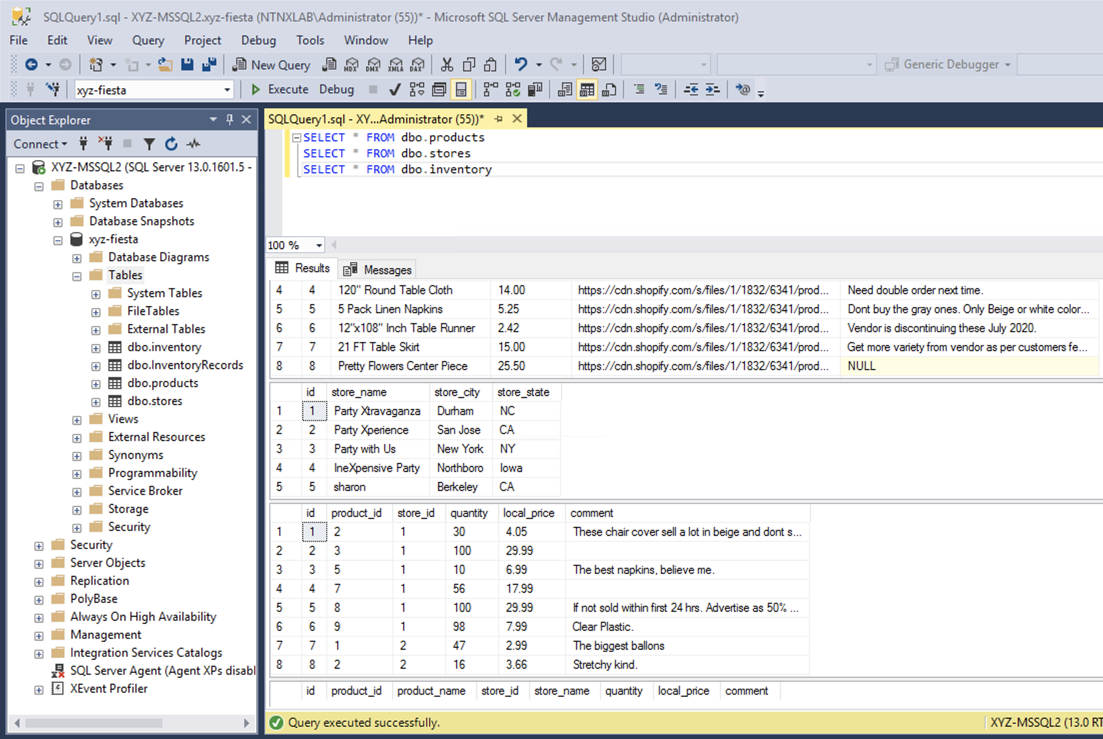
You can view the contents of the database by clicking New Query and executing the following:
SELECT * FROM dbo.products
SELECT * FROM dbo.stores
SELECT * FROM dbo.InventoryRecords
In Era > Time Machines, select your initials-fiesta_TM Time Machine. Select Actions > Log Catch Up > Yes to ensure the imported data has been flushed to disk prior to the cloning operation in the next lab.
Provision Fiesta Web Tier
Manipulating data using SQL Server Management Studio is boring. In this section you’ll deploy the web tier of the application and connect it to your production database.
Download the Fiesta Blueprint by right-clicking here. This single-VM Blueprint is used to provision only the web tier portion of the application.
From Prism Central > Calm, select Blueprints from the lefthand menu and click Upload Blueprint.
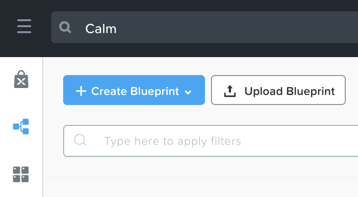
Select FiestaNoDB.json.
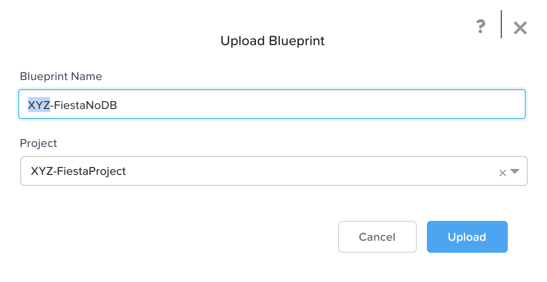
Update the Blueprint Name to include your initials. Even across different projects, Calm Blueprint names must be unique.
Select Initials-Project as the Calm project and click Upload.
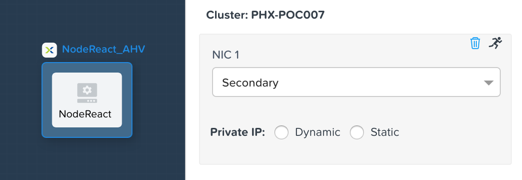
In order to launch the Blueprint you must first assign a network to the VM. Select the NodeReact Service, and in the VM Configuration menu on the right, select Secondary as the NIC 1 network.
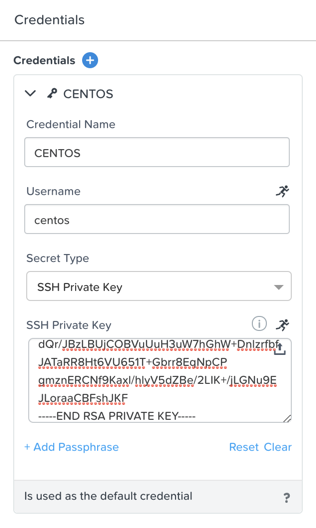
Click Credentials to define a private key used to authenticate to the CentOS VM that will be provisioned by the Blueprint.
Expand the CENTOS credential and use your preferred SSH key, or paste in the following value as the SSH Private Key:
-----BEGIN RSA PRIVATE KEY-----
MIIEowIBAAKCAQEAii7qFDhVadLx5lULAG/ooCUTA/ATSmXbArs+GdHxbUWd/bNG
ZCXnaQ2L1mSVVGDxfTbSaTJ3En3tVlMtD2RjZPdhqWESCaoj2kXLYSiNDS9qz3SK
6h822je/f9O9CzCTrw2XGhnDVwmNraUvO5wmQObCDthTXc72PcBOd6oa4ENsnuY9
HtiETg29TZXgCYPFXipLBHSZYkBmGgccAeY9dq5ywiywBJLuoSovXkkRJk3cd7Gy
hCRIwYzqfdgSmiAMYgJLrz/UuLxatPqXts2D8v1xqR9EPNZNzgd4QHK4of1lqsNR
uz2SxkwqLcXSw0mGcAL8mIwVpzhPzwmENC5OrwIBJQKCAQB++q2WCkCmbtByyrAp
6ktiukjTL6MGGGhjX/PgYA5IvINX1SvtU0NZnb7FAntiSz7GFrODQyFPQ0jL3bq0
MrwzRDA6x+cPzMb/7RvBEIGdadfFjbAVaMqfAsul5SpBokKFLxU6lDb2CMdhS67c
1K2Hv0qKLpHL0vAdEZQ2nFAMWETvVMzl0o1dQmyGzA0GTY8VYdCRsUbwNgvFMvBj
8T/svzjpASDifa7IXlGaLrXfCH584zt7y+qjJ05O1G0NFslQ9n2wi7F93N8rHxgl
JDE4OhfyaDyLL1UdBlBpjYPSUbX7D5NExLggWEVFEwx4JRaK6+aDdFDKbSBIidHf
h45NAoGBANjANRKLBtcxmW4foK5ILTuFkOaowqj+2AIgT1ezCVpErHDFg0bkuvDk
QVdsAJRX5//luSO30dI0OWWGjgmIUXD7iej0sjAPJjRAv8ai+MYyaLfkdqv1Oj5c
oDC3KjmSdXTuWSYNvarsW+Uf2v7zlZlWesTnpV6gkZH3tX86iuiZAoGBAKM0mKX0
EjFkJH65Ym7gIED2CUyuFqq4WsCUD2RakpYZyIBKZGr8MRni3I4z6Hqm+rxVW6Dj
uFGQe5GhgPvO23UG1Y6nm0VkYgZq81TraZc/oMzignSC95w7OsLaLn6qp32Fje1M
Ez2Yn0T3dDcu1twY8OoDuvWx5LFMJ3NoRJaHAoGBAJ4rZP+xj17DVElxBo0EPK7k
7TKygDYhwDjnJSRSN0HfFg0agmQqXucjGuzEbyAkeN1Um9vLU+xrTHqEyIN/Jqxk
hztKxzfTtBhK7M84p7M5iq+0jfMau8ykdOVHZAB/odHeXLrnbrr/gVQsAKw1NdDC
kPCNXP/c9JrzB+c4juEVAoGBAJGPxmp/vTL4c5OebIxnCAKWP6VBUnyWliFhdYME
rECvNkjoZ2ZWjKhijVw8Il+OAjlFNgwJXzP9Z0qJIAMuHa2QeUfhmFKlo4ku9LOF
2rdUbNJpKD5m+IRsLX1az4W6zLwPVRHp56WjzFJEfGiRjzMBfOxkMSBSjbLjDm3Z
iUf7AoGBALjvtjapDwlEa5/CFvzOVGFq4L/OJTBEBGx/SA4HUc3TFTtlY2hvTDPZ
dQr/JBzLBUjCOBVuUuH3uW7hGhW+DnlzrfbfJATaRR8Ht6VU651T+Gbrr8EqNpCP
gmznERCNf9Kaxl/hlyV5dZBe/2LIK+/jLGNu9EJLoraaCBFshJKF
-----END RSA PRIVATE KEY-----
Click Save and click Back once the Blueprint has completed saving.
Click Launch and fill out the following fields:
Name of the Application - Initials-Fiesta
db_password - nutanix/4u
db_name - Initials-fiesta (as configured when you deployed through Era)
db_dialect - mssql
db_domain_name - ntnxlab.local
db_username - Administrator
db_host_address - The IP of your Initials-MSSQL2 VM
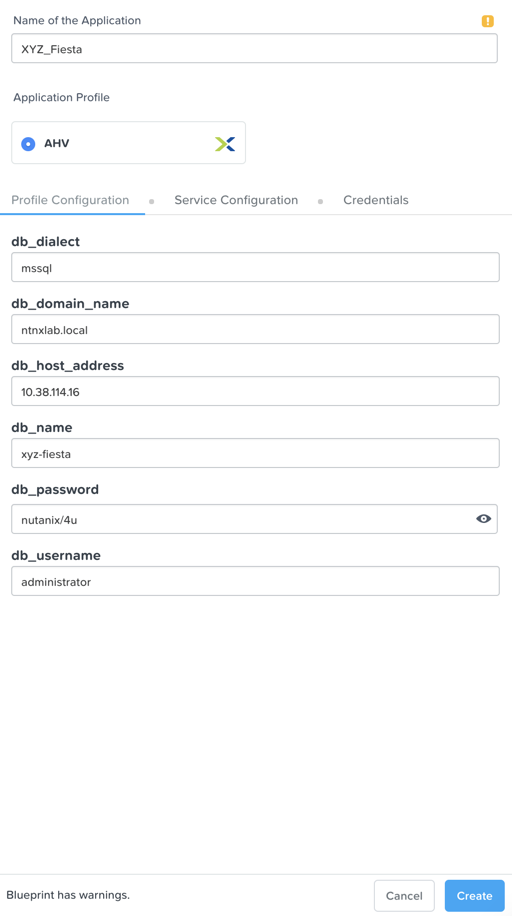
Click Create.
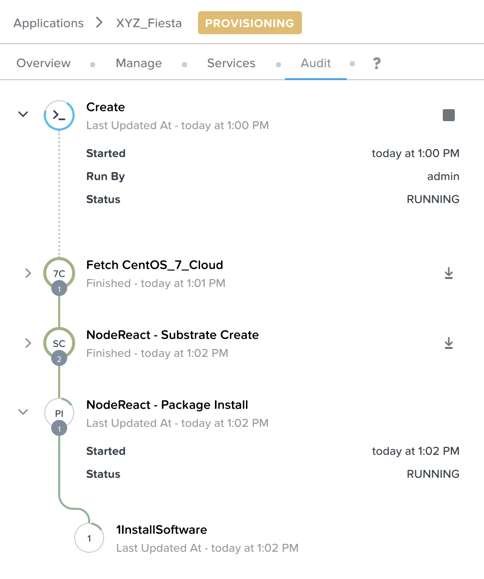
Select the Audit tab to monitor the deployment. This process should take < 5 minutes.
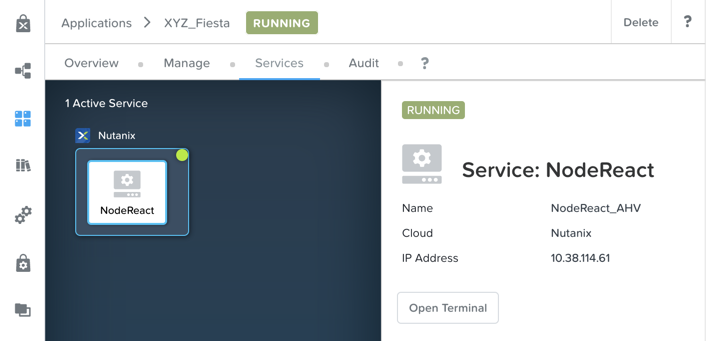
Once the application status changes to Running, select the Services tab and select the NodeReact service to obtain the IP Address of your web server.
Open http://NODEREACT-IP-ADDRESS:5001/ in a new browser tab to access the Fiesta application.
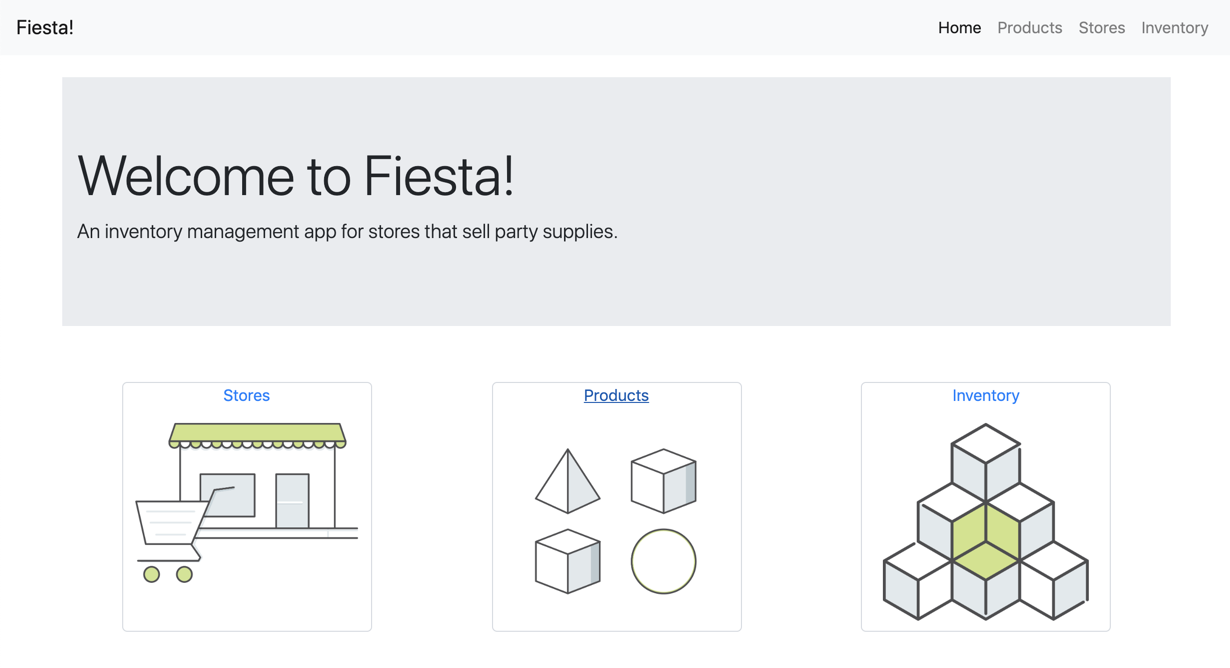
Congratulations! You’ve completed the deployment of your production application.
Takeaways
What are the key things we learned in this lab?
Existing databases can be easily onboarded into Era, and turned into templates
Existing brownfield databases can also be registered with Era
Profiles allow administrators to provision resources based on published standards
Customizable recovery SLAs allow you to tune continuous, daily, and monthly RPO based on your app’s requirements
Era provides One-click provisioning of multiple database engines, including automatic application of database best practices