Era REST API Explorer
Overview
Note
Estimated time to complete: 15 MINUTES
In this lab you will explore the Era REST API Explorer.
Using the Era REST API Explorer
Era features an “API first” architecture and provides a fully documented REST API to allow for automation and orchestration of its functions through external tools. Similar to Prism, Era also provides a Rest API Explorer to easily discover and test API functions.
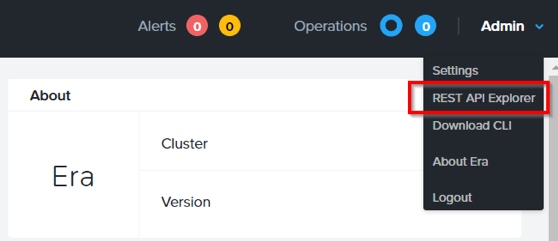
From the menu bar, select Admin > REST API Explorer from the top right.
Expand the different categories to view the available operations, including registering Nutanix clusters, registering and provisioning databases, cloning and refreshing databases, updating profiles and SLAs, and getting operation and alert information.
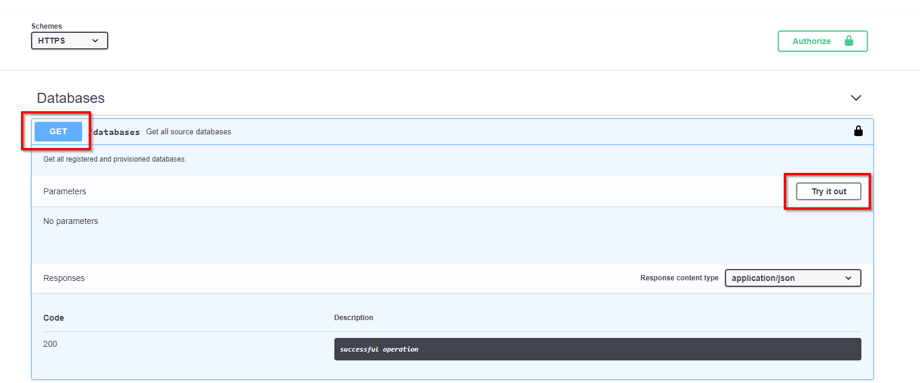
As a simple test, expand Databases > GET /databases.
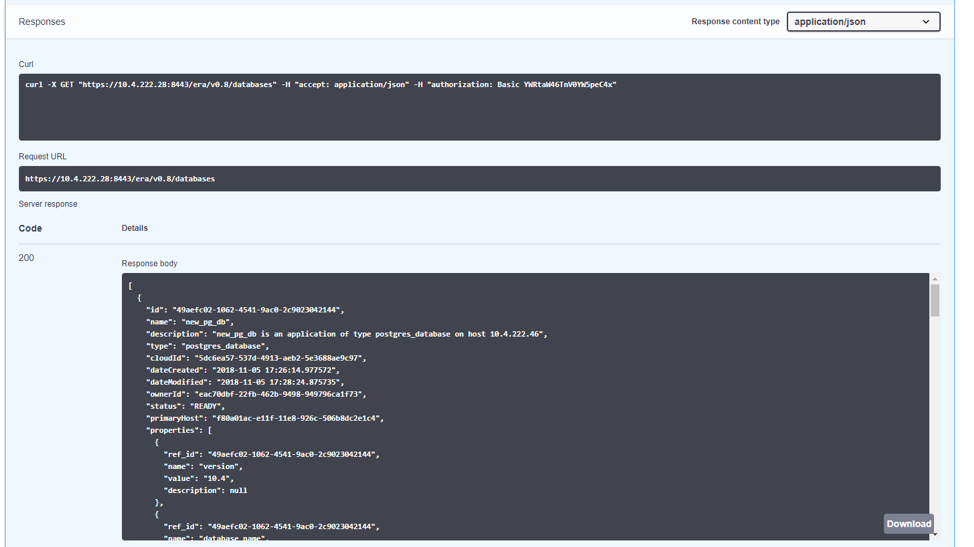
This function returns JSON containing details regarding all registered and provisioned databases and requires no additional parameters.
Click Try it out > Execute.
You should receive a JSON response body similar to the image below.
This API can be used to create powerful workflows using tools like Nutanix Calm, ServiceNow, Ansible, or others. As an example you could provision a Calm blueprint containing the web tier of an application and use a Calm eScript to invoke Era to clone an existing database and return the IP of the newly provisioned database to Calm.
Takeaways
Era provides a REST API to allow for integration with other orchestration and automation tools.