Deploying Oracle with Era
Each quarter, Oracle releases a grouping of patches referred to as a PSU. In this lab you will walk through the deployment and patching of both Oracle and Grid software for an Oracle 19c database using Era.
Create Oracle Server with Era
In this exercise you will deploy a fresh Oracle database using your Initials_ORACLE_19C 1.0 Software Profile.
Select Databases from the dropdown menu and Sources from the lefthand menu.
Click + Provision > Single Node Database.
In the Provision a Database wizard, fill out the following fields to configure the Database Server:
Engine - Oracle
Database Server - Create New Server
Database Server Name - Initials_oracle_prod
Description - (Optional)
Software Profile - Initials_ORACLE_19C
Compute Profile - ORACLE_SMALL
Network Profile - Primary_ORACLE_NETWORK
Select Enable High Availability
SYS ASM Password - oracle
SSH Public Key for Node Access - Select Text
ssh-rsa AAAAB3NzaC1yc2EAAAABJQAAAQEAii7qFDhVadLx5lULAG/ooCUTA/ATSmXbArs+GdHxbUWd/bNGZCXnaQ2L1mSVVGDxfTbSaTJ3En3tVlMtD2RjZPdhqWESCaoj2kXLYSiNDS9qz3SK6h822je/f9O9CzCTrw2XGhnDVwmNraUvO5wmQObCDthTXc72PcBOd6oa4ENsnuY9HtiETg29TZXgCYPFXipLBHSZYkBmGgccAeY9dq5ywiywBJLuoSovXkkRJk3cd7GyhCRIwYzqfdgSmiAMYgJLrz/UuLxatPqXts2D8v1xqR9EPNZNzgd4QHK4of1lqsNRuz2SxkwqLcXSw0mGcAL8mIwVpzhPzwmENC5Orw==
Note
By selecting Enable High Availability, Oracle Grid is configured as part of the deployment and Oracle Automatic Storage Management (ASM) is used for volume management. Without High Availability enabled, Linux LVM and file systems would be used for database storage. Grid and ASM are required for clustered Oracle RAC deployments.
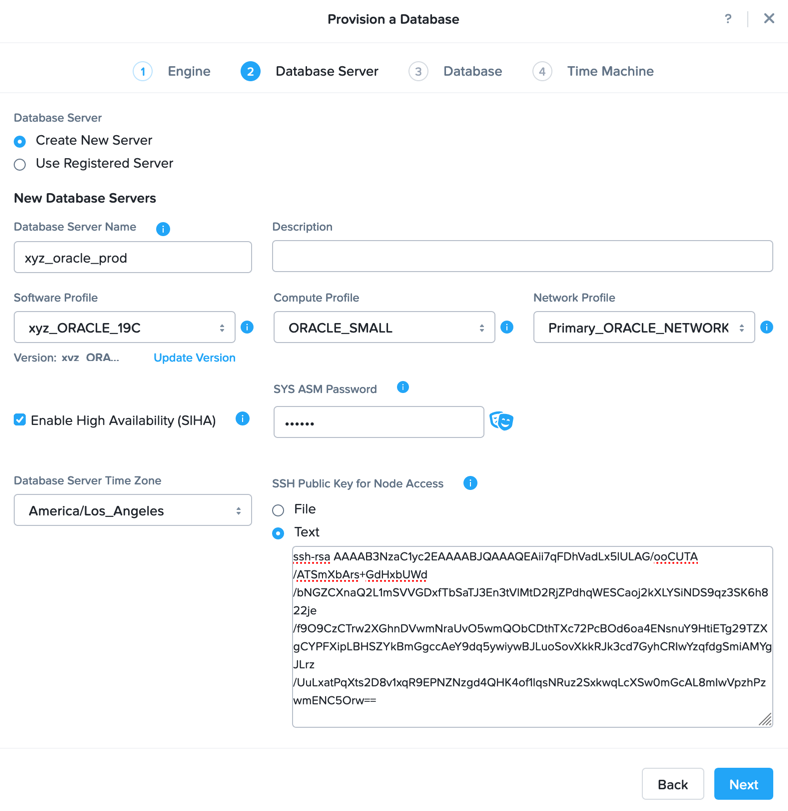
Click Next, and fill out the following fields to configure the Database:
Database Name - Initials_proddb
SID - Initialsprod
SYS and SYSTEM Password - Nutanix/4u
Database Parameter Profile - ORACLE_SMALL_PARAMS
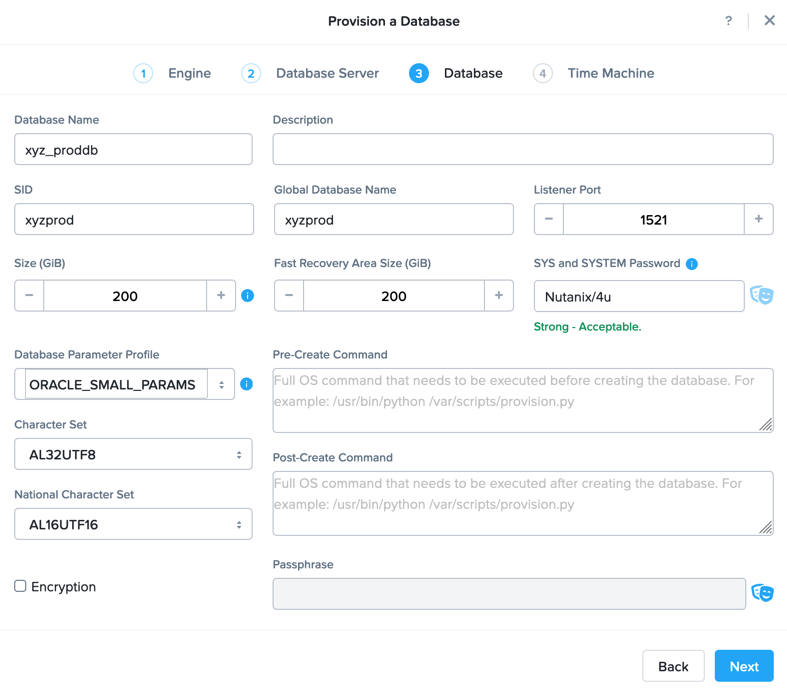
Note
For each database engine supported by Era, you have the opportunity to run scripts before and after database creation. Common use cases include:
Data masking scripts
Register the database with DB monitoring solution
Scripts to update DNS/IPAM
Scripts to automate application setup, such as app-level cloning for Oracle PeopleSoft
Encryption can be used in situations where compliance requires encryption and stops would-be attackers from bypassing the database and reading sensitive information directly from storage by enforcing data-at-rest encryption in the database layer.
Click Next and fill out the following fields to configure the Time Machine for your database:
Name - Initials_proddb_TM (Default)
Description - (Optional)
SLA - DEFAULT_OOB_GOLD_SLA
Schedule - (Defaults)
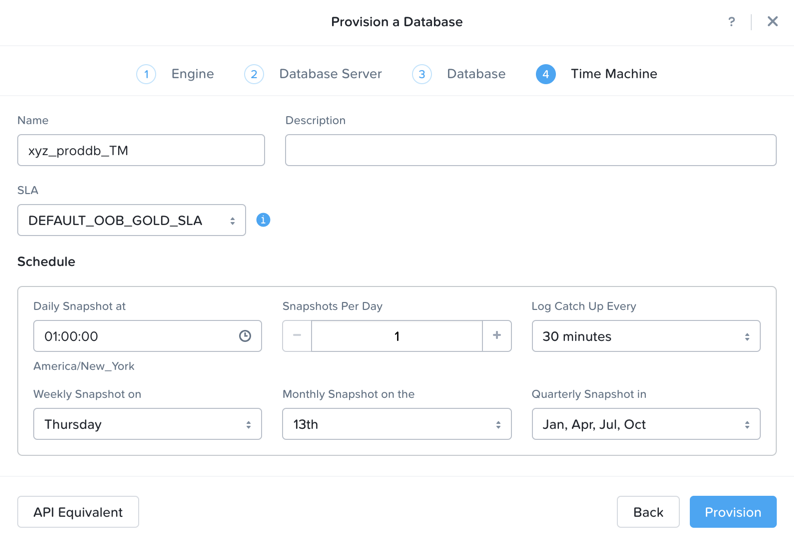
Click Provision to begin creating your new database server VM and Initials_proddb database.
Select Operations from the dropdown menu to monitor the provisioning. This process should take approximately 60 minutes (depending on your cluster configuration).
Please proceed to the following exercises while the database is being provisioned.